HTML_QuickForm_advmultiselect
[ class tree: HTML_QuickForm_advmultiselect ] [ index: HTML_QuickForm_advmultiselect ] [ all elements ]

Class: HTML_QuickForm_advmultiselect

Source Location: /HTML_QuickForm_advmultiselect-1.3.0/advmultiselect.php

Class Overview

HTML_QuickForm_select
   |
   --HTML_QuickForm_advmultiselect

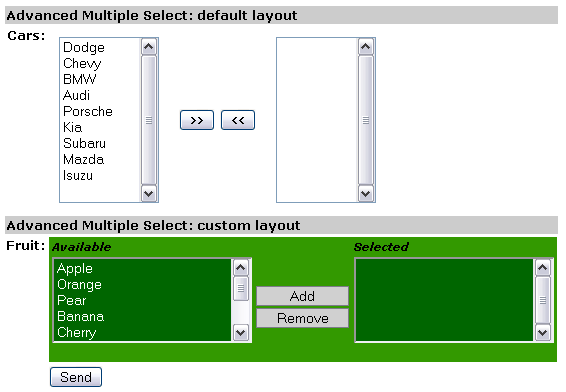
Element for HTML_QuickForm that emulate a multi-select.


Author(s):

Version:

  • Release: 1.3.0

Copyright:

  • 2005-2007 Laurent Laville

Methods


Inherited Variables

Inherited Methods


Class Details

[line 78]
Element for HTML_QuickForm that emulate a multi-select.

The HTML_QuickForm_advmultiselect package adds an element to the HTML_QuickForm package that is two select boxes next to each other emulating a multi-select.

PHP versions 4 and 5

LICENSE: This source file is subject to version 3.01 of the PHP license that is available through the world-wide-web at the following URI: http://www.php.net/license/3_01.txt. If you did not receive a copy of the PHP License and are unable to obtain it through the web, please send a note to license@php.net so we can mail you a copy immediately.


[ Top ]


Method Detail

HTML_QuickForm_advmultiselect (Constructor)   [line 270]

void HTML_QuickForm_advmultiselect( [string $elementName = null], [mixed $elementLabel = null], [mixed $options = null], [mixed $attributes = null], [integer $sort = null])

Class constructor
  • Since: 0.4.0
  • Access: public

Parameters:

string   $elementName   —  Dual Select name attribute
mixed   $elementLabel   —  Label(s) for the select boxes
mixed   $options   —  Data to be used to populate options
mixed   $attributes   —  Either a typical HTML attribute string or an associative array
integer   $sort   —  Either SORT_ASC for auto ascending arrange, SORT_DESC for auto descending arrange, or NULL for no sort (append at end: default)

[ Top ]

getElementCss   [line 518]

string getElementCss( [boolean $raw = true])

Gets default element stylesheet for a single multi-select shape render

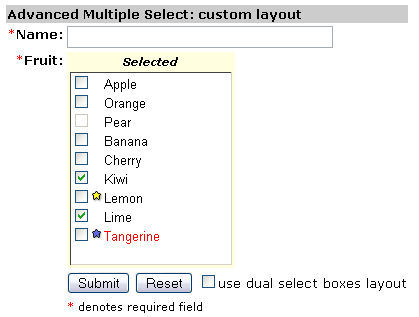
In custom example 4, the template defined lines 80-87 allows a single multi-select checkboxes shape. Useful when javascript is disabled (or when browser is not js compliant). In our example, no need to add javascript code (see lines 170-172), but css is mandatory (see line 142).


Parameters:

boolean   $raw   —  (optional) html output with style tags or just raw data

[ Top ]

getElementJs   [line 822]

string getElementJs( [boolean $raw = true])

Returns the javascript code generated to handle this element

Parameters:

boolean   $raw   —  (optional) html output with script tags or just raw data

[ Top ]

setButtonAttributes   [line 365]

void setButtonAttributes( string $button, [mixed $attributes = null])

Sets the button attributes

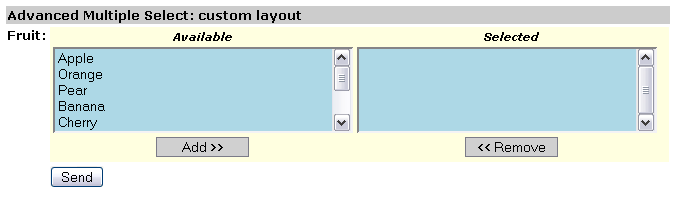
In custom example 1, the add and remove buttons have look set by the css class inputCommand. See especially lines 43-48 and 98-103.

In custom example 2, the basic text add and remove buttons are now replaced by images. See lines 43-44.

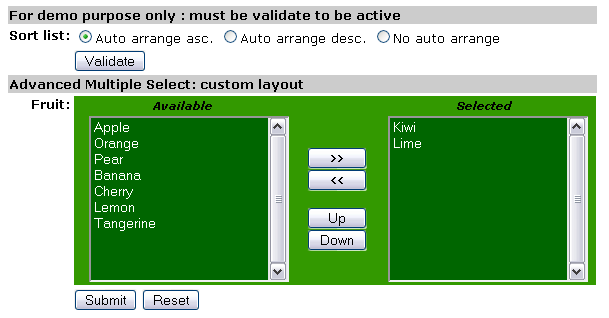
In custom example 5, we have ability to sort the selection list (on right side) by :

  - user-end: with Up and Down buttons
    (see lines 65,65,76 and 128-130)
  - programming: with the QF element constructor $sort option
    (see lines 34,36,38 and 59)


Parameters:

string   $button   —  Button identifier, either 'add', 'remove', 'all', 'none', 'toggle', 'moveup' or 'movedown'
mixed   $attributes   —  (optional) Either a typical HTML attribute string or an associative array

[ Top ]

setElementTemplate   [line 472]

void setElementTemplate( string $html)

Sets element template
  • Since: 0.4.0
  • Access: public

Parameters:

string   $html   —  The HTML surrounding select boxes and buttons

[ Top ]

setJsElement   [line 495]

void setJsElement( [string $pref = null], [string $post = 'moveSelections'])

Sets JavaScript function name parts. Maybe usefull to avoid conflict names

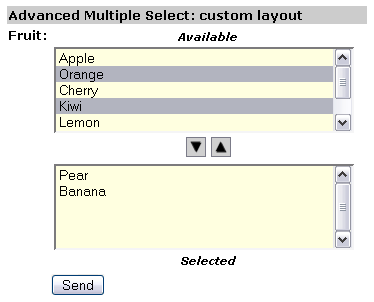
In multiple example 1, the javascript function prefix is set to not null (see line 60).


Parameters:

string   $pref   —  (optional) Prefix name
string   $post   —  (optional) Postfix name

[ Top ]

toHtml   [line 538]

string toHtml( )

Returns the HTML generated for the advanced mutliple select component
  • Since: 0.4.0
  • Access: public

[ Top ]


Documentation generated on Mon, 11 Mar 2019 14:53:02 -0400 by phpDocumentor 1.4.4. PEAR Logo Copyright © PHP Group 2004.