HTML_QuickForm_advmultiselect
[ class tree: HTML_QuickForm_advmultiselect ] [ index: HTML_QuickForm_advmultiselect ] [ all elements ]

Class: HTML_QuickForm_advmultiselect

Source Location: /HTML_QuickForm_advmultiselect-1.4.1/advmultiselect.php

Class Overview

HTML_QuickForm_select
   |
   --HTML_QuickForm_advmultiselect

Element for HTML_QuickForm that emulate a multi-select.


Author(s):

Version:

  • Release: @package_version@

Copyright:

  • 2005-2008 Laurent Laville

Methods


Inherited Variables

Inherited Methods


Class Details

[line 62]
Element for HTML_QuickForm that emulate a multi-select.

The HTML_QuickForm_advmultiselect package adds an element to the HTML_QuickForm package that is two select boxes next to each other emulating a multi-select.


[ Top ]


Method Detail

HTML_QuickForm_advmultiselect (Constructor)   [line 260]

void HTML_QuickForm_advmultiselect( [string $elementName = null], [mixed $elementLabel = null], [mixed $options = null], [mixed $attributes = null], [integer $sort = null])

Class constructor

Class constructors : Zend Engine 1 uses HTML_QuickForm_advmultiselect, while Zend Engine 2 uses __construct

  • Since: 0.4.0
  • Access: public

Parameters:

string   $elementName     Dual Select name attribute
mixed   $elementLabel     Label(s) for the select boxes
mixed   $options     Data to be used to populate options
mixed   $attributes     Either a typical HTML attribute string or an associative array
integer   $sort     Either SORT_ASC for auto ascending arrange, SORT_DESC for auto descending arrange, or NULL for no sort (append at end: default)

[ Top ]

getElementCss   [line 513]

string getElementCss( [boolean $raw = true])

Gets default element stylesheet for a single multi-select shape render

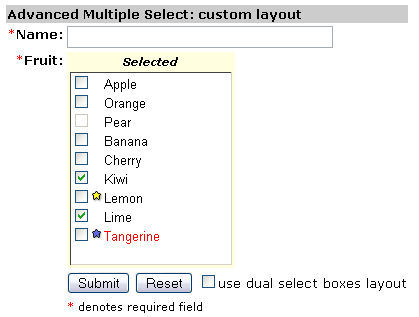
In custom example 4, the template defined allows a single multi-select checkboxes shape. Useful when javascript is disabled (or when browser is not js compliant). In our example, no need to add javascript code, but css is mandatory.


Parameters:

boolean   $raw     (optional) html output with style tags or just raw data

[ Top ]

getElementJs   [line 928]

string getElementJs( [boolean $raw = true])

Returns the javascript code generated to handle this element

Parameters:

boolean   $raw     (optional) html output with script tags or just raw data

[ Top ]

setButtonAttributes   [line 363]

void setButtonAttributes( string $button, [mixed $attributes = null])

Sets the button attributes

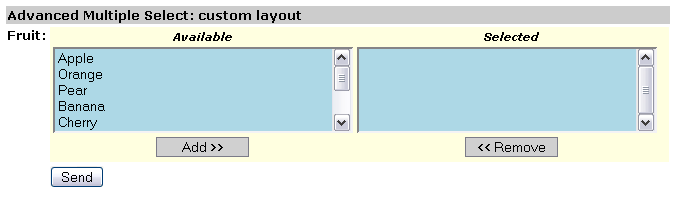
In custom example 1, the add and remove buttons have look set by the css class inputCommand.

In custom example 2, the basic text add and remove buttons are now replaced by images.

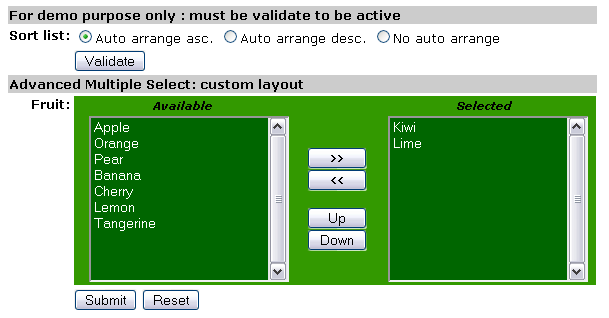
In custom example 5, we have ability to sort the selection list (on right side) by :

  - user-end: with Up and Down buttons
  - programming: with the QF element constructor $sort option


Parameters:

string   $button     Button identifier, either 'add', 'remove', 'all', 'none', 'toggle', 'moveup' or 'movedown'
mixed   $attributes     (optional) Either a typical HTML attribute string or an associative array

[ Top ]

setElementTemplate   [line 463]

void setElementTemplate( string $html)

Sets element template
  • Since: 0.4.0
  • Access: public

Parameters:

string   $html     The HTML surrounding select boxes and buttons

[ Top ]

setJsElement   [line 488]

void setJsElement( [string $pref = null], [string $post = 'moveSelections'])

Sets JavaScript function name parts. Maybe usefull to avoid conflict names

In multiple example 1, the javascript function prefix is set to not null.


Parameters:

string   $pref     (optional) Prefix name
string   $post     (optional) Postfix name

[ Top ]

toHtml   [line 533]

string toHtml( )

Returns the HTML generated for the advanced mutliple select component
  • Since: 0.4.0
  • Access: public

[ Top ]


Documentation generated on Sat, 26 Apr 2008 14:30:06 -0400 by phpDocumentor 1.4.0. PEAR Logo Copyright © PHP Group 2004.